
Here’s how to manage your ETT course:
NOTE: A video with quiz and is available as CME for this instructor update at: https://learn.dhss.alaska.gov/
It guides you through every aspect of managing your course including: course creation, student rosters and closing out your class.
The video with Wilma Vinton below:
Managing your Courses
by Wilma Vinton MICP & Director of Interior Region EMS Council
Course Creation:
Step 1: Apply for the course approval at the Alaska EMS Licensure Management System. You will receive a letter from the state with course number, dates and directions on closing your class.
.
2. You can choose open enrollment for your class which allows students to find your class and self register or you can add them to your roster (please note, only students with active accounts can be added or enrolled). *If your students need help creating an account please refer to ETT Student Registration Info page.
This is what that section looks like while creating a course to allow student registrations:

If you choose to populate your class roster with students this is what that will look like: (please note, only students with active accounts can be added or enrolled)
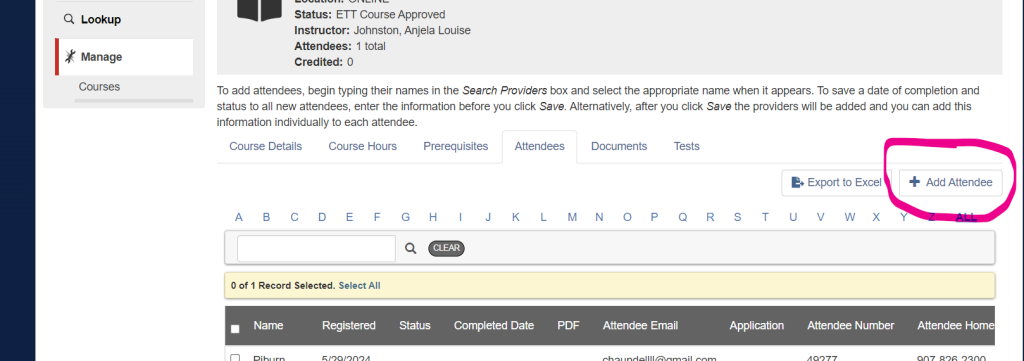
Closing out your class:
At the end of your class, you will close it out in the State LMS system by adding test scores, putting pass/fail and uploading skills portfolio sheets along with finalizing completion requirements sent in the approval letter it should look something like this:
- Apply for Course Approval through the Alaska EMS License Management System. (referred to as the Alaska EMS Public Portal)
- Once logged into the portal follow: Manage/add new course/ initial or renewal course/ ETT
- A course approval letter will automatically be emailed to you, the instructor of record. This approval letter contains a list of everything you will need to officially “Close out” your class.
- You can choose to add students manually to your roster or have them register for your course during the application process. Once approved, anyone can search for your course on the Portal landing page under the education tab located on the left hand side.
- If you need resources, textbooks, patches or pins please go to our website.
- At the conclusion of your class, you must fill out the student roster in the Alaska EMS License Management System. You can do this by logging into the portal, then go to the manage tab on the left. Note: you will not be able to add students or manage aspects of your class if you go to the “education tab” and search your class.
To accomplish closing your course do the following:
- Ensure all of your students are listed on the official roster under the attendees tab. In order to do this, your students must have an LMS account.
- Set your attendee’s status to either- Pass, Complete, Fail, Incomplete, or Withdrew and set the date of completion in the Student record. (may be completed by “bulk actions” drop down located under the names on the roster page).
- Upload the students completed ETT Skills Checkoff Sheets under the documentation tab.
- Send an email to me at carin.marter@alaska.gov, notifying her that the course has been completed. Please include the course number and name in your email. She will officially close your class
After your course is successfully closed, your students will then submit an ETT application in the Alaska EMS Licensure Management System.
The computer system will automatically check the application for valid training, so if you don’t close out your class properly, your students will not obtain certification.
ETT registrations are $25.00 and can be paid here on our Website either by each student or by the instructor or agency for an entire class. If you are paying for an entire class, simply select the number of students and enter your class number so we tie each class to the invoice. NOTE: Youth are still free. Simply have your students mark that they are high school students in their applications and also send Virgil an email with the number of youth students you have and he will waive the fee!
When your class is completed and closed by Carin, and student applications are complete, the system will approve them and each student will receive an automatic ETT Card and Certificate in their email from emsinfo@alaska.gov. Their cards will also be in their registered profile available for download anytime. They will also be available in the public lookup search area.
Thank you for teaching across Alaska! SEREMS is here to help with all your classes.
Any questions please email Chaundell at: ETT@SEREMS.org or Virgil at: finance@SERMS.org